
 Kia Soul: Advanced lighting speaker (if equipped)
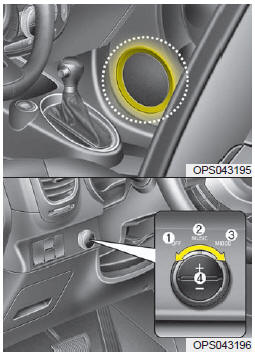
The advanced lighting speaker that lights around the front speaker is adjusted by turning the knob as follows.
1. OFF : The light turns off.
2. MUSIC :
The light blinks or changes shade according to the sound of the audio. If the audio is not turned on, the light does not turn on.
3. MOOD :
The light shade changes automatically at regular interval.
4. +/- :
When the lights are on, push the illumination button to adjust the light intensity.
If low lighting grade is selected, the intensity of light may be weak or may not illuminate according to the audio volume or selected condition.
The lighting around the front speaker may not illuminate when the sound of the audio is low.
Do not use the lights for extended periods when engine is not running. It may cause battery discharge.
✽ NOTICE
When the doors are opened, the lighting system will not operate.
 Aux, USB and iPod®* port (if equipped)
If your vehicle has an aux and/or USB(universal serial bus) port or iPod® port,
you can use an aux port to connect audio devices and an USB port to plug in an USB
and also an iPod® port to p ...
 How vehicle audio works
AM and FM radio signals are broadcast from transmitter towers located around
your city. They are intercepted by the radio antenna on your vehicle.
This signal is then processed by the radio and ...
See also:
Blower Motor Inspection
1.
Connect the battery voltage and check the blower motor rotation.
2.
If the blower motor does not operate well, substitute with a know ...
Troubleshooting
Trouble Symptom
Probable cause
Remedy
Vehicle pulls to one side
Scoring of driveshaft ball joint
Replace
Wear, rattle or scoring of wheel b ...
ETC (Electronic Throttle Control) System. Repair procedures
Inspection
Throttle Position Sensor (TPS)
1.
Connect the GDS on the Data Link Connector (DLC).
2.
Start the engine and measure the output v ...