
 Kia Soul: AVN Head Unit Removal
Put on gloves to protect your hands.
|

|

| 1. |
Disconnect the negative (-) battery terminal.
|
| 2. |
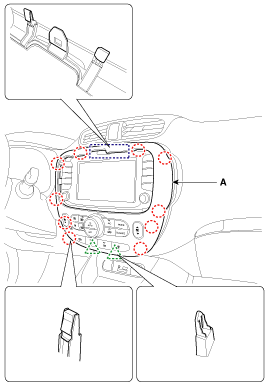
Remove the center fascia panel (A) from the crash pad.
|
| 3. |
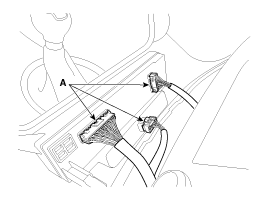
Disconnect the connecters (A) from the center fascia panel.
|
| 4. |
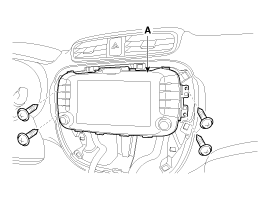
Remove the AVN head unit (A) after loosening the mounting
screws.
|
| 5. |
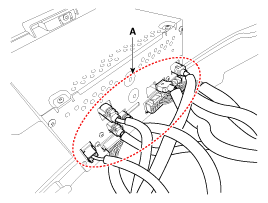
Disconnect the connectors (A) from the AVN heat unit.
|
 AVN Head Unit Components
AVN (A/V & Navigation) Head Unit
Connector
Connector Pin Information
No.
Connector A
Connector B
Connector C
...
 AVN Head Unit Installation
1.
Connect the AVN head unit connectors.
2.
Install the AVN head unit.
3.
Install the ...
See also:
Tire maintenance
In addition to proper inflation, correct wheel alignment helps to decrease tire
wear. If you find a tire is worn unevenly, have your dealer check the wheel alignment.
When you have new tires instal ...
Emergency Fastening Device (EFD). Removal
1.
Disconnect the battery negative cable, and wait for at least thirty
seconds before beginning work.
2.
To remove the emergency fastening ...
Checking the coolant level
WARNING Removing radiator cap
Never attempt to remove the radiator cap while the engine is operating or
hot. Doing so might lead to cooling system and engine damage and could result in
seriou ...